Why This Distinction Causes So Much Confusion
The confusion usually starts because UX and UI are part of the same design process. They both contribute to the final website or app, and they both influence how users experience a product. When people see a polished interface, they often assume that everything behind it belongs to one design discipline.
In practice, UX and UI solve different problems.
UX design is concerned with structure, usability, logic and flow. It asks questions like: Is the journey clear? Can users find what they need? Does the page guide them toward the right action?
UI design is concerned with visual presentation and interface detail. It asks: Does this feel clear on screen? Are the buttons easy to notice? Does the layout feel consistent and aligned with the brand?
Another reason for confusion is that businesses sometimes use the terms interchangeably when what they really mean is better website design in general. That is understandable, but the difference matters because weak UX and weak UI create different kinds of problems.
A website can look polished and still be frustrating to use. It can also be logically structured but visually flat, unclear or inconsistent. Good digital design needs both sides working together.
What UX Design Covers
UX design, or user experience design, focuses on how people move through and interact with a digital product. Its goal is to make the experience useful, intuitive and friction-free.
This usually starts before visual design begins. UX design looks at the bigger picture of the user journey and the decisions that support it.
UX design often includes:
- understanding user needs and expectations
- mapping journeys and flows
- organising content and page hierarchy
- planning navigation structure
- identifying friction points
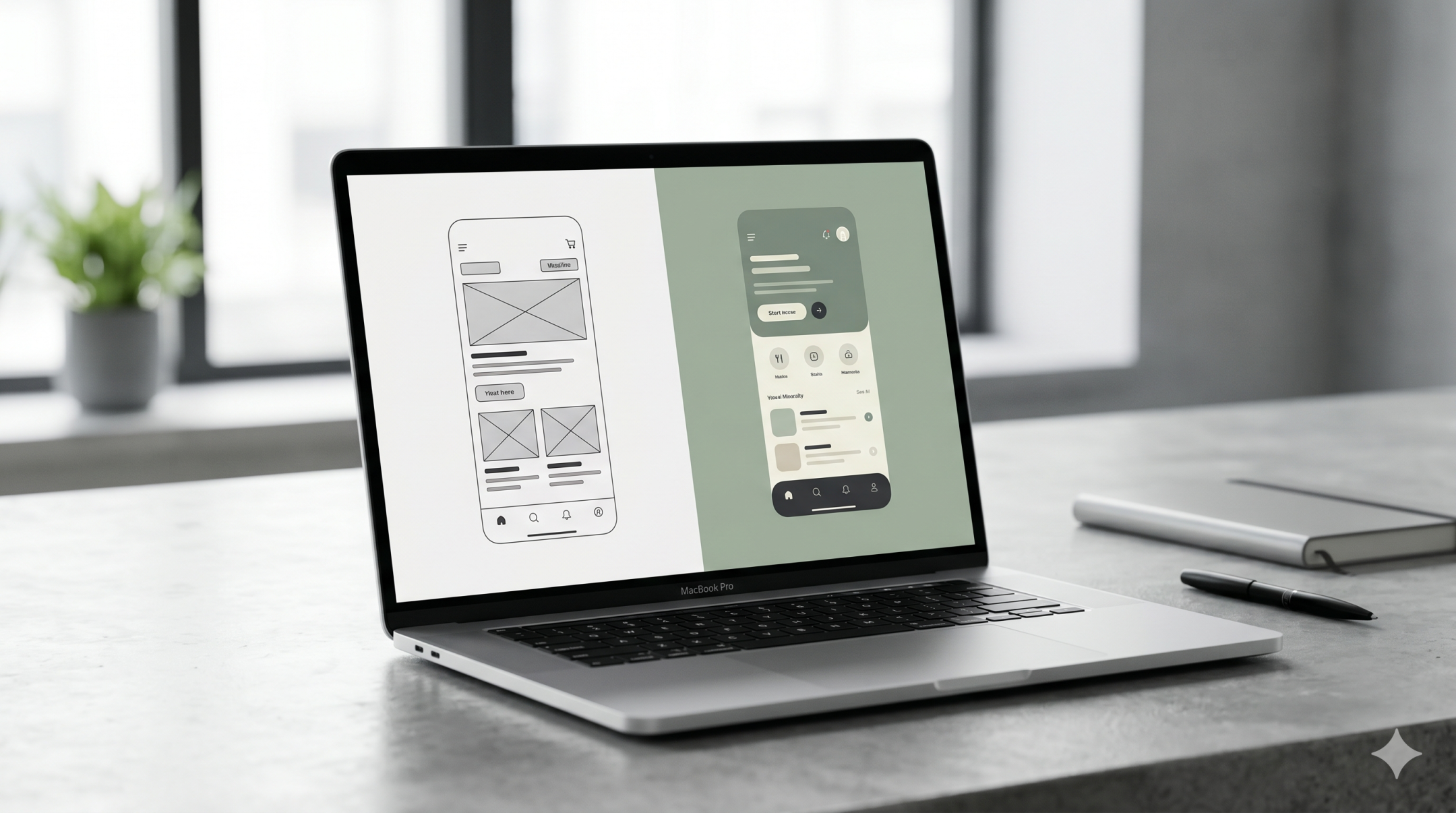
- creating wireframes and low-fidelity layouts
- shaping conversion paths and task completion
A UX designer is not just thinking about what appears on a screen. They are thinking about why it appears there, in what order, and how that helps users move forward.
For example, on a service website, UX design helps determine:
- what a visitor needs to understand first
- how service information should be grouped
- where trust signals should appear
- how many steps it takes to make contact
- whether the site feels clear or overwhelming
Strong UX design reduces confusion. It helps people understand where they are, what they can do next and why the experience makes sense.
Without strong UX, even a beautiful site can feel difficult. Users may struggle to find information, lose confidence or drop out before taking action.
What UI Design Covers
UI design, or user interface design, focuses on the visual and interactive layer of a digital product. It turns structure into something users can actually see, understand and use on screen.
If UX is about the blueprint of the experience, UI is about the interface that brings that blueprint to life.
UI design often includes:
- layout styling
- typography choices
- colour systems
- button and form design
- spacing and alignment
- iconography
- visual hierarchy
- interaction states such as hover, active and disabled states
- consistency across screens and components
A UI designer works to make the interface feel clear, appealing and coherent. They help users recognise what is clickable, what matters most on the page and how the brand should feel in a digital environment.
For example, UI design influences:
- whether a call to action stands out clearly
- whether a form feels approachable or intimidating
- whether the page feels clean and modern or cluttered and dated
- whether interface elements feel consistent from one page to the next
Good UI design supports usability, but it does so through visual decisions. It makes interaction easier by improving clarity, hierarchy and feedback.
Without strong UI, a website may technically work, but it can still feel hard to read, visually confusing or disconnected from the brand. That weakens trust and makes the overall experience less effective.
The Main Differences Between UX and UI
Function
The main function of UX design is to shape the experience itself. It defines how the journey works, how content is organised and how users move from one step to another.
The main function of UI design is to shape the interface through which that experience is delivered. It determines how screens look, how interactions are presented and how the visual system supports clarity.
Put simply, UX solves for usability and flow. UI solves for presentation and interaction on screen.
Focus
UX design focuses on logic, behaviour and user needs. It looks at the structure behind the interface and asks whether the experience is clear, efficient and useful.
UI design focuses on visual clarity, consistency and interface feel. It looks at the presentation layer and asks whether the experience is attractive, understandable and easy to interact with.
UX is often more strategic and structural. UI is more visual and execution-focused, though strong UI still requires strategic thinking.
Deliverables
UX and UI often produce different outputs during a project.
Typical UX deliverables include:
- user flows
- site maps
- content hierarchy
- wireframes
- journey maps
- usability recommendations
Typical UI deliverables include:
- high-fidelity screen designs
- component libraries
- button styles
- colour and type systems
- interactive states
- visual design mockups
This distinction is useful for clients because it shows that digital design is not only about finished screens. There is important decision-making that happens before visual polish begins.
Business Impact
Weak UX tends to create friction. Users struggle to navigate, miss key information or abandon tasks before converting. The result is often lower engagement, lower conversion and more confusion.
Weak UI tends to create hesitation. Users may question credibility, miss key actions or feel that the brand lacks quality and consistency. The result can be weaker trust and a less convincing digital presence.
Strong UX supports performance by improving clarity and reducing effort. Strong UI supports performance by improving comprehension, confidence and brand perception.
Businesses do not usually benefit from choosing one over the other. They benefit when both are handled properly.
How UX and UI Work Together
UX and UI are most effective when they are treated as connected parts of the same system.
UX creates the structure for a better user journey. UI makes that structure clear, usable and visually engaging. One without the other creates imbalance.
A few simple examples show how this works in practice:
- UX decides that a page needs a clear path from problem to solution to enquiry.
- UI decides how that path is visually expressed through layout, hierarchy and calls to action.
- UX decides how navigation should be grouped so users can find services quickly.
- UI decides how that navigation looks, behaves and signals interaction.
- UX decides that users need reassurance before taking action.
- UI helps surface that reassurance through visual hierarchy, trust blocks and readable design.
This is why good digital work does not treat UX and UI as separate silos. The strongest results come when structural thinking and interface design support each other from the start.
For businesses, that usually means the goal is not to ask whether a project needs UX or UI. The better question is whether the digital experience is being designed in a way that supports both usability and visual clarity.
FAQs
Is UX design more important than UI design?
Not really. They solve different problems. UX design helps make a digital experience usable and logical. UI design helps make that experience clear, attractive and easy to interact with. In most real projects, both matter.
Can one person do both UX and UI design?
Yes, especially in smaller teams or simpler projects. Many designers work across both areas. What matters is that both the structural and visual sides of the experience are being handled properly, whether by one person or several.
Is wireframing UX or UI?
Wireframing usually sits closer to UX design because it focuses on structure, layout logic and content priorities before visual styling is applied.
Does UI design only mean making things look nice?
No. Good UI design is not decoration. It helps users read, understand and interact with an interface more easily. Visual decisions affect usability, trust and clarity.
Can a website have good UI but poor UX?
Yes. A website can look polished while still being difficult to navigate or confusing to use. This is one of the most common digital design problems.
How do businesses know if they have a UX problem or a UI problem?
If users are struggling with structure, flow, navigation or task completion, the issue is often UX-related. If the experience feels visually unclear, inconsistent or hard to interpret on screen, the issue may be more UI-related. In many cases, both need review together.
Final Thoughts
The difference between UX design and UI design becomes much clearer when you look at what each one is responsible for. UX design shapes the logic and usability of the experience. UI design shapes the visual interface that users interact with. They are different disciplines, but they work best in combination.
For businesses, this distinction matters because better digital outcomes do not come from aesthetics alone. They come from creating experiences that are structured well, easy to use and visually clear at every stage of the journey.
If you are reviewing a website or planning a new digital project, it helps to look beyond surface design and ask whether the experience is both usable and visually strong. That is where UX and UI create their real value together.
If your website needs a clearer structure, a stronger interface or a more joined-up digital experience overall, it may be worth reviewing how UX thinking and UI execution are working together across the project.